


Favor: Texas Food Delivery
4.513.55K Reviews
App Specs
- Version
- 6.16.0
- Updated On
- License
- Free
- Downloads
- 1,000,000+
- Developer
- NeighborFavor, Inc.
- Categories
- Food & Drink
- Platform
- Android, iOS
Screenshots


 Analysis by AppCompare
I tried Favor: Texas Food Delivery as an everyday food-and-errand app, and my first impression was that it is built around convenience rather than endless browsing. Its identity is very local: NeighborFavor, Inc. presents it as a way to order in across Texas, combining food delivery with a broader “favor” mindset instead of treating the service like a simple restaurant menu. That makes it especially interesting for people who want one familiar place for meals and occasional everyday requests.
The app is free to install and is rated for Everyone, so it is easy to recommend as a low-risk trial. It sits in the Food & Drink category, has reached over a million installs, and holds an average rating of 4.5 from around sixty-four thousand ratings. Those figures suggest a well-established service, but they do not remove the need to judge it by your own neighborhood, ordering habits, and tolerance for delivery costs or timing changes.
How Favor fits into a normal ordering routine
The basic workflow is straightforward: open the app, choose what you want, review the order, and follow the delivery as it moves toward you. I found the biggest benefit was not learning a complicated interface; it was having a single starting point when I did not want to switch between several restaurant apps. For a quick dinner, that reduction in small decisions matters more than a long list of advanced tools.
A realistic use case is a busy weekday evening. I might finish work late, realize there is nothing useful at home, and use Favor to look for a nearby meal rather than opening a map, checking separate restaurant sites, and comparing delivery arrangements one by one. The app works best in that moment when convenience is the priority and I already have a general idea of what I want to eat.
I would still check the order summary carefully before confirming. Delivery apps can make the menu selection feel quick, while the final total and timing deserve a slower look. I pay attention to the restaurant, item choices, special instructions, estimated arrival, and any fees shown during checkout. That habit is more valuable than rushing through the app because a small customization mistake is much harder to fix after the order is already moving.
Favor is also useful when the recipient is not me. Sending food to a family member, a friend, or someone working from home can be convenient, but I would enter the destination and contact details deliberately rather than relying on memory. A delivery service is only as smooth as the handoff, so clear instructions and a reachable recipient can prevent the kind of confusion that no ordering interface can solve.
What I check before placing an order
My first check is whether the restaurant and menu match the occasion. A familiar local option may be a better choice than an unfamiliar listing when I need predictable food, while a broader selection is useful when several people want different things. I also look at the estimated timing before becoming attached to a particular meal. If I am ordering for a fixed break or gathering, a slightly simpler choice with a more suitable arrival window can be smarter than chasing a specific dish.
Worth Reading Before You Choose

EA SPORTS FC Mobile 26 Is a Bigger Football Game, but It Takes Time

Flipboard Shows What News Apps Must Do Beyond the Feed

Switching to Android Auto Means Rethinking Your Driving Routine

Google Calendar Makes a Crowded Week Easier to Manage

Ludo King Makes the Most of the Minutes Between Plans

Baby Panda World Brings Quick Play to Modern Phones, but Its Game Library Feels Busy
Customization deserves special attention. I review modifiers one by one, especially for toppings, sides, drinks, and dietary preferences. I do not assume that a note can replace a formal menu option, because a restaurant may interpret free-text instructions differently from a selectable item. When an order is for someone else, I also confirm that the choices make sense for that person rather than treating the recipient’s preferences as an afterthought.
Another useful habit is separating “I want this restaurant” from “I need food soon.” Those are different goals. Favor can be a good fit when I care about a particular local place, but if timing matters more than the restaurant, I compare the available options before settling on the first appealing menu. That small pause helps avoid disappointment when the most tempting choice is not the most practical one.
Settings and account details worth reviewing
I recommend checking the account and notification areas soon after installing the app. Delivery updates are most helpful when they arrive on the device I am actually watching, and contact details should be current before I place an order for another person. I also review saved addresses and remove old destinations that could create ambiguity. This is a simple maintenance task, but it becomes important when home, work, and family locations are all used from the same account.
Notifications can be useful without being allowed to dominate the phone. I prefer keeping alerts that help me act, such as meaningful order progress, while reducing anything that feels unnecessary. The right balance depends on how often I order, but the general principle is clear: notifications should help me notice a delivery change, not make the app feel noisy between orders.
I would also inspect the checkout screen each time instead of assuming that a previous order represents today’s conditions. Restaurant availability, delivery timing, selected address, and the final amount can vary by order. Even if the app remembers useful information, I treat saved details as a convenience rather than proof that everything is still correct.
The current version is 6.15.0, and keeping the app updated is sensible for an ordering service because reliability depends on the app communicating correctly with the service behind it. I do not see updating as a feature in itself, but it is part of a dependable routine. If something behaves strangely, I first check that my connection, address, and app version are current before assuming the restaurant or delivery process is at fault.
Faster patterns that save more time than frantic tapping
Experienced use is mostly about preparation. I keep a short mental list of dependable restaurants for different situations: a quick solo meal, a group order, and a comfort-food option when I do not want to experiment. I do not need to search from scratch every time, and I avoid choosing based only on the first attractive photo. This makes the app feel faster without requiring any unconfirmed shortcut or special feature.
For repeat orders, I rebuild the order carefully instead of blindly repeating it. The previous choice may still be useful as a reference, but I check the portion, modifiers, drinks, destination, and timing. Menus change, and a remembered order can contain an old preference that no longer suits the person eating it. The efficient pattern is not “never review”; it is “review the parts most likely to matter.”
Group ordering benefits from a clear plan. I collect everyone’s choices before opening checkout, then enter the order with fewer interruptions. If several people are sharing food, I check whether the selected quantities and sides match the group rather than assuming the app will make that judgment. This reduces back-and-forth and makes it easier to identify who needs to be contacted if a substitution or clarification becomes necessary.
I also avoid ordering at the last possible minute when the meal is tied to a meeting, appointment, or event. Favor can reduce the effort of arranging delivery, but it cannot guarantee that every external factor will line up perfectly. Ordering earlier gives me more room to respond if the restaurant is busy, an item is unavailable, or the delivery timing changes.
One non-obvious trade-off is that a broad service can encourage over-ordering. When the app makes several restaurants feel equally close, I may add extras simply because they are easy to browse. I counter that by deciding the meal size before scrolling. This keeps the convenience of the app from turning into unnecessary spending or a less focused order.
Where Favor is stronger than the usual alternatives
Compared with ordering directly from individual restaurants, Favor offers a more unified starting point. I do not need to remember which restaurant has its own app, which one uses a website, or which one handles delivery differently. That is particularly useful for local Texas food choices and for people who order from several places rather than having one regular restaurant.
Compared with a restaurant’s own ordering channel, however, a dedicated restaurant app may sometimes feel more direct for loyal customers. If I already know exactly what I want from one place and that restaurant provides a smooth first-party experience, using its own system can involve fewer layers. Favor’s advantage is breadth and convenience; the direct channel’s advantage can be familiarity and a tighter connection to that specific restaurant.
Compared with calling by phone, Favor gives me a written order to review and reduces the risk of mishearing item details. Phone ordering can still be preferable when a request is unusually complicated and needs a conversation, but for ordinary menu choices I prefer seeing the selections on screen. The visual confirmation is especially helpful when ordering for someone with strong preferences.
The app is not automatically the best choice for every delivery situation. If I am extremely price-sensitive, I compare the final checkout amount with other available ways to order rather than assuming convenience is the cheapest path. If I need a guaranteed arrival for an important event, I avoid depending on any delivery app as the sole plan. And if Favor does not offer a useful option in my immediate area, a local restaurant’s own service may be more practical.
Limits that become clearer with regular use
The main limitation is that the app cannot eliminate the uncertainty built into delivery. Restaurant preparation, traffic, weather, and handoff problems can affect the experience even when the ordering steps work correctly. I treat the displayed timing as a planning aid, not a promise that lets me schedule something down to the minute.
Another limitation is the gap between a menu and the meal that arrives. An item can look simple in the app but involve important choices hidden in modifiers or notes. I read the description and review the entire order before paying. This is particularly important for allergies or strict dietary needs: I would contact the restaurant directly when the consequences of an unclear ingredient are serious, rather than relying on an assumption made from a short menu description.
Support expectations should also be realistic. If an order has a problem, I would gather the relevant details first: what was ordered, what arrived, and whether the issue concerns the restaurant, the delivery, or my own selection. A clear report is more useful than a vague complaint. I would not wait until the food is gone to inspect the order, especially when it is being shared with other people.
The app’s local focus is both a strength and a boundary. Someone who wants Texas-oriented ordering may find that identity appealing, while a traveler or user outside the service’s practical coverage may gain less from installing it. The store summary’s Texas emphasis is not just a slogan to me; it sets the expectation that the best experience depends on being in an area where the service and participating restaurants are useful.
Who should use it, and who should skip it
I would recommend Favor to Texas residents who want a convenient way to browse local food delivery, people who order from multiple restaurants, and households that occasionally send meals to someone else. It is also a good fit for anyone who prefers reviewing an order visually instead of placing routine requests by phone. The free price makes trying it easy, and the Everyone age rating means it is not presented as an adults-only service.
I would be more cautious recommending it to someone who orders only from one restaurant, has a strict delivery budget, or needs a highly predictable arrival time. Those users may prefer a direct restaurant channel, pickup, or a carefully planned alternative. I would also tell anyone with serious allergy concerns to verify ingredients with the restaurant rather than treating a delivery interface as a substitute for direct confirmation.
For families, the most useful approach is to establish a repeatable routine: keep addresses accurate, decide the recipient before browsing, review modifiers, and check the final order before confirming. For solo users, the winning habit is simpler: choose the priority first—speed, restaurant, dietary fit, or convenience—and let that priority guide the search. Without that decision, the wide choice can become a distraction.
My final view after using it as a routine tool
Favor: Texas Food Delivery feels most successful when I use it deliberately rather than treating it as an endless restaurant catalog. Its value comes from bringing local food ordering into one familiar workflow, with enough flexibility for everyday meals and occasional delivery requests. NeighborFavor, Inc. has built an app that is easy to approach, but the best results still come from careful address checks, realistic timing, and a final review of the order.
The service has a substantial user base, with more than a million installs and around fourteen thousand written reviews, which gives it the feel of an established option rather than a new experiment. I would not use popularity as my only reason to choose it, but it supports the idea that Favor is worth testing if its Texas-focused delivery model matches where I live and how I order.
My practical verdict is simple: Favor is strongest when convenience and local choice matter more than absolute price or guaranteed timing. I would install it for regular food delivery, keep my account details tidy, and use a short list of dependable ordering patterns. I would skip it when a direct restaurant order is clearly simpler, when the total cost is the deciding factor, or when an important occasion requires a backup plan. For the right user, it is a useful everyday companion; for everyone else, its value depends on whether that local, flexible approach genuinely saves effort.
Pros
- Wide selection of Texas restaurants and local food spots
- Convenient delivery tracking from order placement to arrival
- Easy reordering of favorite meals
- Multiple payment options available in the app
- Helpful restaurant menus with prices and item details
Cons
- Delivery availability can vary significantly by location
- Service and delivery fees may increase the final order cost
- Busy periods can lead to longer-than-estimated delivery times
- Restaurant menus and prices may not always be updated promptly
- Customer support response times can vary during peak hours
FAQs for Favor: Texas Food Delivery
What is Favor: Texas Food Delivery?
Favor is a Texas-focused food and convenience delivery app that lets you order meals, groceries, drinks, household essentials, and other items from nearby restaurants and retailers. After entering your delivery address, you can browse available merchants, customize your order, follow its progress, and communicate with your assigned Runner when necessary. Availability and selection depend on your location.
How does ordering and delivery work in Favor?
To place an order, choose a participating restaurant or store, add products to your cart, review substitutions or special instructions, and confirm your delivery details and payment method. Favor then assigns a Runner to pick up and deliver the order. The app usually provides status updates and an estimated arrival time, although traffic, restaurant preparation, weather, and item availability can affect the final delivery time.
How much does Favor cost, and are there additional fees?
The final price may include the item total, delivery or service fees, taxes, and an optional tip for the Runner. Fees can vary according to distance, demand, order type, and the merchant you select. Before confirming payment, review the complete checkout breakdown carefully. If you order regularly, check whether a Favor membership or promotional offer is available in your area.
Can I track my Favor order or contact the delivery Runner?
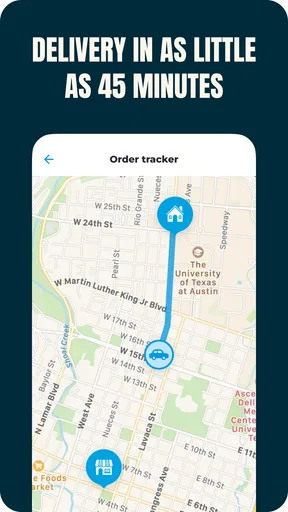
Yes. Once your order is accepted and assigned, Favor generally displays progress through the app, including preparation, pickup, and delivery stages. Depending on the order, you may also be able to contact the Runner through in-app messaging or calling features. Keep your phone accessible and make sure delivery instructions are accurate, especially for apartments, offices, gated communities, or contact-free drop-offs.
What should I do if my Favor order is late, incorrect, damaged, or missing items?
If there is a problem with your delivery, open the order details in the Favor app and use the available help or support option as soon as possible. Clearly describe whether the order is late, missing products, incorrect, damaged, or never arrived, and include photos when useful. Resolution may depend on the merchant, delivery status, and the specific circumstances of the order.


